
This guide describes how to manually enter the ID into empty CGSULIT valves using the TPMS90 device. The sensor IDs are first determined using a diagnostic device. You will also find a video tutorial at the bottom of the page.
1. Determining the sensor IDs using diagnostics
Connect a suitable diagnostic device to the vehicle (in our case, the Launch X431 PRO5).
- Read the IDs of the individual TPMS sensors.
- Carefully write down all IDs.
Once you have recorded all the necessary sensor IDs, disconnect the diagnostic device from the vehicle.
2. Selecting manual entry in the TPMS90 device
- On the TPMS90 device, select the Advanced Mode icon in the main menu.
- Select the make, type, and model of the vehicle.
- Select the Copy by Manual Input function.
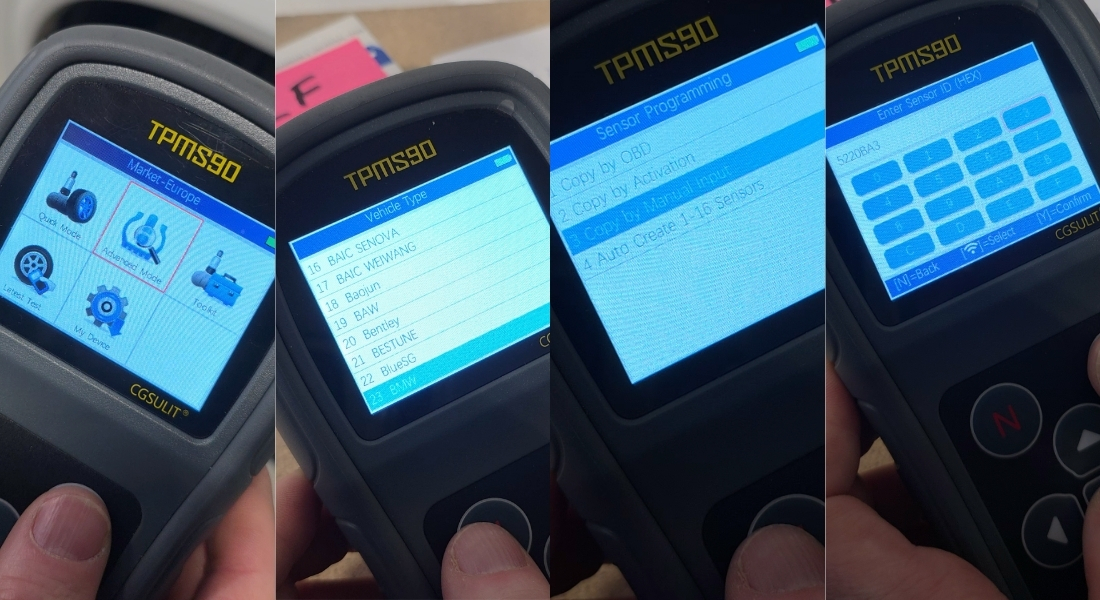
3. Manual ID entry and sensor programming
- On the screen, manually enter the ID of the sensor you want to program.
- Confirm your selection with the middle button.
- Confirm your entry with the Y button.
The device will then prompt you to place it against the sensor (valve).
IMPORTANT NOTICE:
During programming, all other sensors must be at least 120 cm away from the sensor being programmed. Otherwise, the device may detect another sensor in the vicinity.
Recommendation: Keep the programmed sensor near the device and place the other sensors on a distant table, for example.
- Place the device next to the sensor.
- The ID will be uploaded to the empty valve.
- A confirmation of successful programming will appear on the screen.
Repeat the procedure in the same way for all sensors you want to program.
4. Installing the sensors
Once all sensors have been programmed, you can install them on the vehicle's wheels, completing the TPMS sensor programming process.